 PixelVision Lab
Automatic edge detection
Local OpenCV processing finds the document boundary and proposes all four corners. Low-confidence suggestions remain editable instead of blocking the scan.
Scan paper documents with automatic edge detection, straighten every page and export a clean multipage PDF. Camera, correction, enhancement and export all happen on your phone.
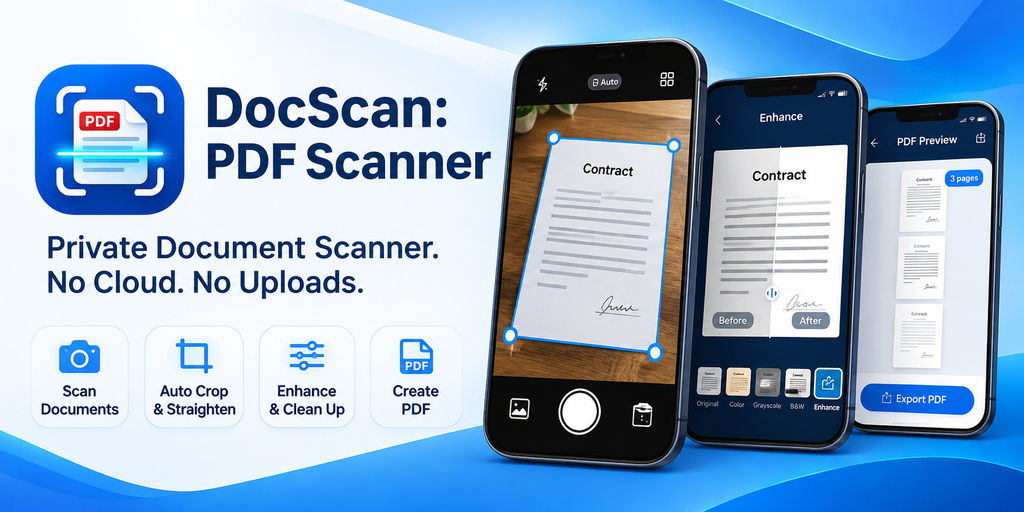
Real screens from the app. Scan or import a page, place the corners, improve readability, organize the document and export the final file.


Scroll horizontally for all five screens.
Each page moves through capture, geometry and cleanup before it joins the document. Details stay adjustable after saving.
Use the camera to capture a page or import JPEG, PNG and other supported gallery images. DocScan looks for the page boundary as soon as the image arrives.
Drag any corner the detector missed, then apply perspective correction. Choose an enhancement preset and fine-tune brightness, contrast, sharpness and intensity.
Add more pages, set their order and export a PDF using A4, Letter or the original page aspect. Individual pages can also leave as JPEG or PNG files.
Purpose-built document tools keep the path from camera to PDF direct, while local processing keeps every page on your device.
Local OpenCV processing finds the document boundary and proposes all four corners. Low-confidence suggestions remain editable instead of blocking the scan.
Drag each corner precisely to the paper edge. The app validates the shape, then applies a perspective transformation to square up the page.
Keep the original colors or use Color, Grayscale, Black & White and Document presets. Brightness, contrast, sharpness and intensity are adjustable.
Add, reorder, replace, delete and reopen pages. Document names and page order are saved so the whole file stays editable from the local library.
Choose A4, US Letter or a page that follows the original image aspect. Set image quality before the PDF is generated locally in the page order you arranged.
Export one page or every page as JPEG or PNG. Image exports use the corrected and enhanced page, not the raw camera preview.
Recent scans live in one searchable, app-private library. Rename, reopen or delete documents without creating an account or syncing a cloud folder.
Scanning, correction, enhancement, storage and PDF generation run locally. The production app has no Internet permission, no analytics and no document upload.
Use the scanner in English or Vietnamese, with light, dark and system themes. Core features remain available in airplane mode.
Need more help? The support page covers common scan and export problems.
No. Camera frames, imported images, corrected pages, thumbnails and generated PDFs are processed and stored on your device. DocScan does not create accounts, upload scans or send document content to analytics.
Yes. Capture, gallery import, edge detection, perspective correction, enhancement, local storage, PDF generation and JPEG or PNG export work offline. The production DocScan build does not request the Internet permission.
No. DocScan creates page images and PDFs, but it does not include OCR, text recognition or text search. Any text in the PDF is part of the page image.
When you choose Save to Downloads, exports are copied to Downloads/DocScan through Android MediaStore. You can also share an export or open a PDF in Android’s print flow without moving the original scan.
Continue to the corner editor and drag each of the four handles to the page boundary. For difficult photos, place the document on a contrasting surface, avoid hard shadows and keep all four corners inside the frame.
Yes. Open the document from the library to add, replace, reorder, rename or delete pages. Page corners and enhancement settings can be reopened and changed before the next export.
Install DocScan: PDF Scanner from Google Play and turn your next stack of paper into a clean local PDF.